Residential Systems Designer

Smart Home
Engineering.

A 1,400-entity Apple-grade home in London — designed, built, and commissioned end-to-end. Whole-home integration across lighting, climate, AV, energy, and security.

Try a scene →

3610 K · daytime balance

Get in touch →
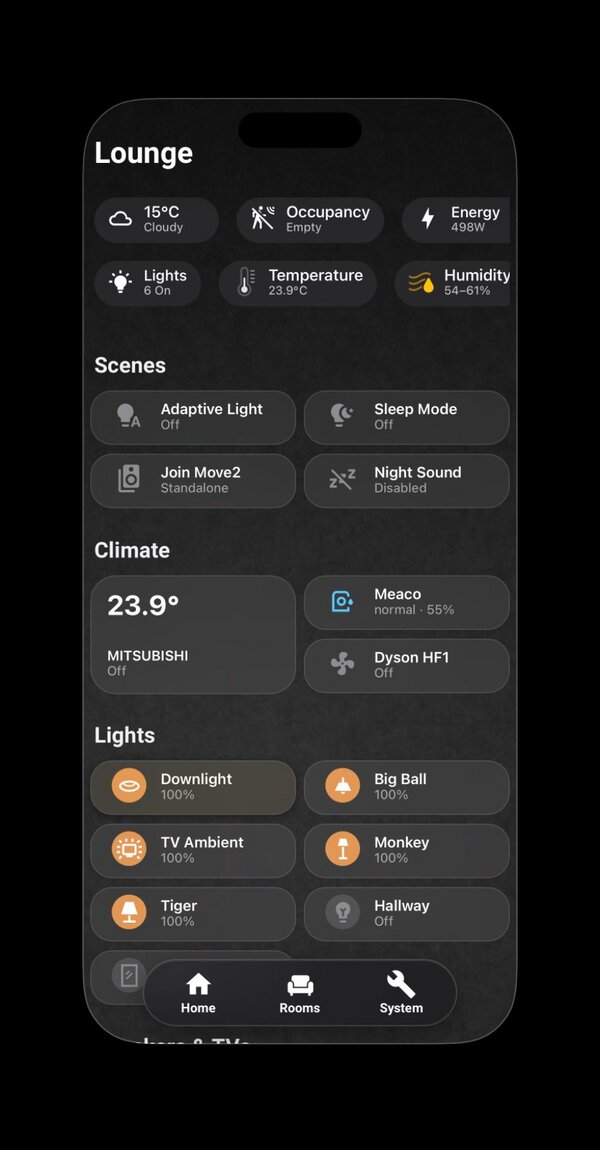
Lounge view of the dashboard, showing climate, scenes, and tunable-white lights

At a Glance

What this project is, in numbers.

A self-directed project built to demonstrate three things relevant to high-end residential integration: that I can think in whole systems, communicate technical decisions in plain language, and deliver to a premium standard of polish.

The Dashboard

One design language, six rooms.

Each room follows the same structure — status bar, contextual controls, fixed dock — but the content respects the room. Kitchen tracks appliances, Lounge centres on media, Bathroom stays minimal.

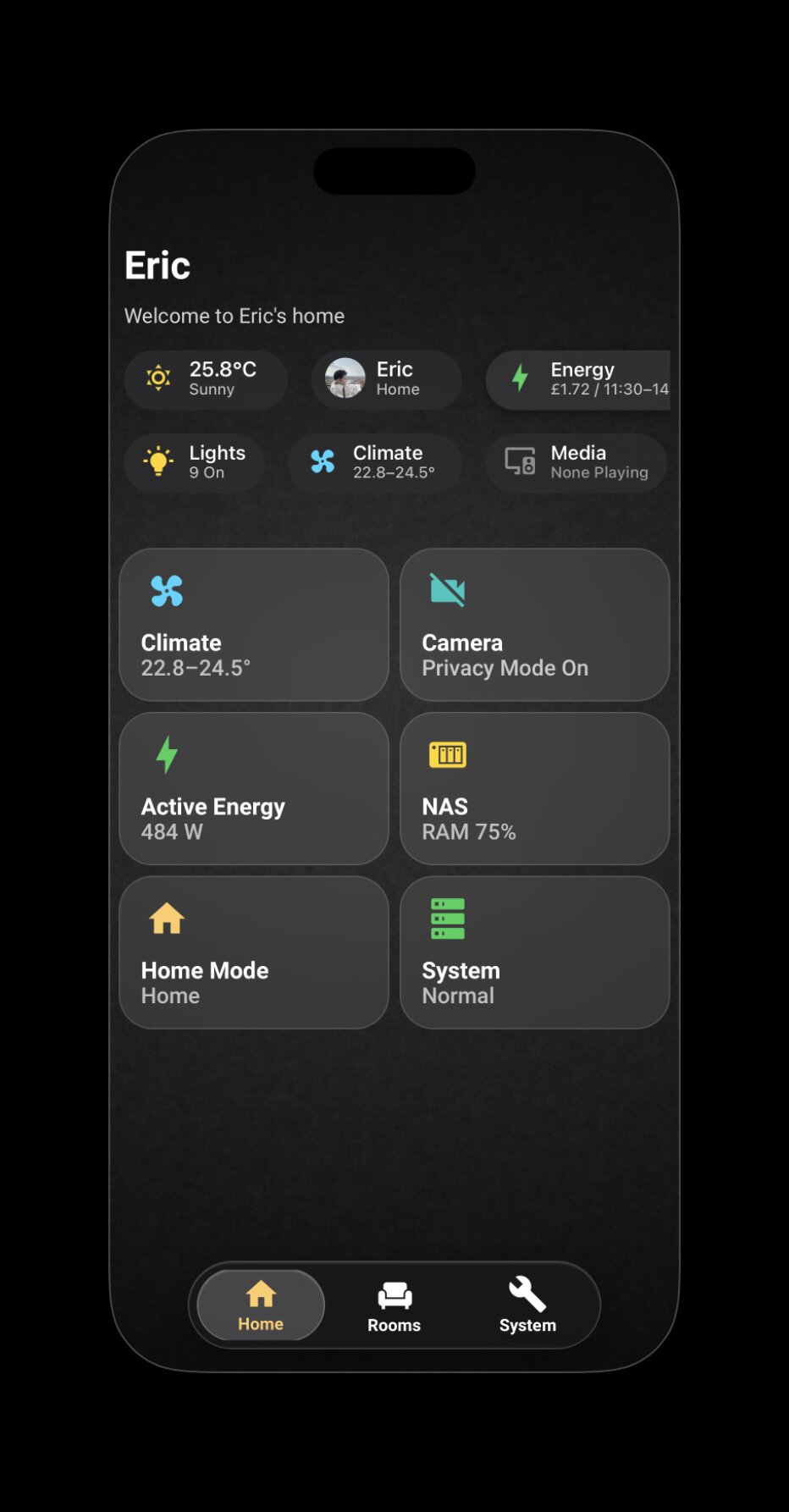
Home view — the entry point, with weather, identity, lights, climate, camera privacy, and system status all at a glance
Home — the entry point. Six tiles cover the dimensions a high-end client actually asks about: climate, security, energy, system health. Everything else lives one tap away.
Lounge view
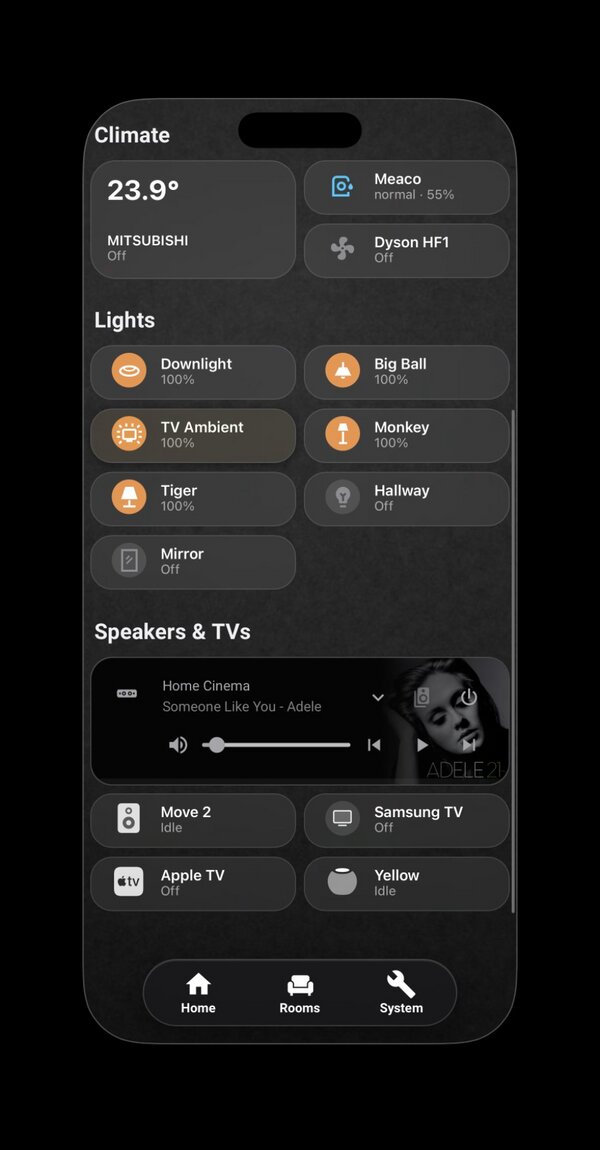
Lounge · Climate, Dyson HF1, six tunable-white lights, media.
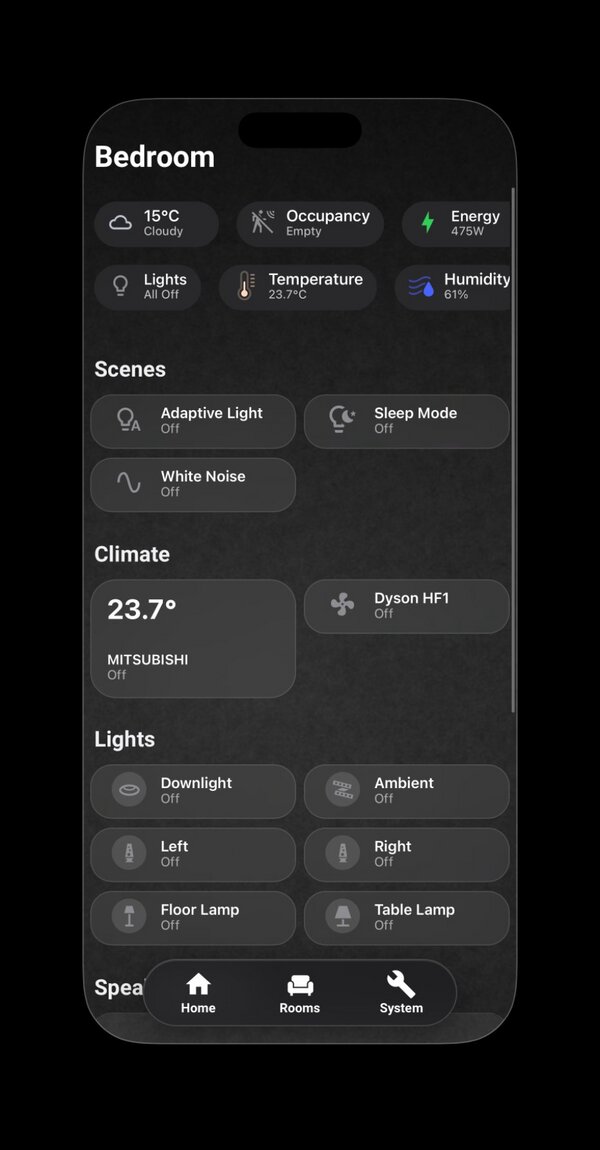
Bedroom view
Bedroom · Bedside lamp control, White Noise scene, AC.
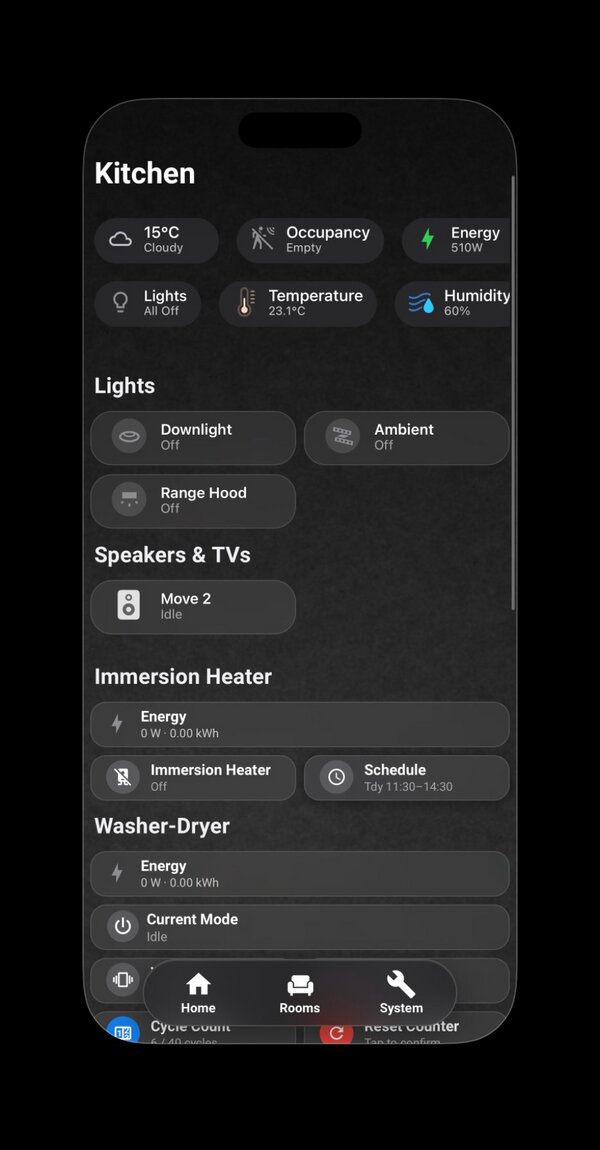
Kitchen view
Kitchen · Per-appliance energy, immersion heater scheduling.
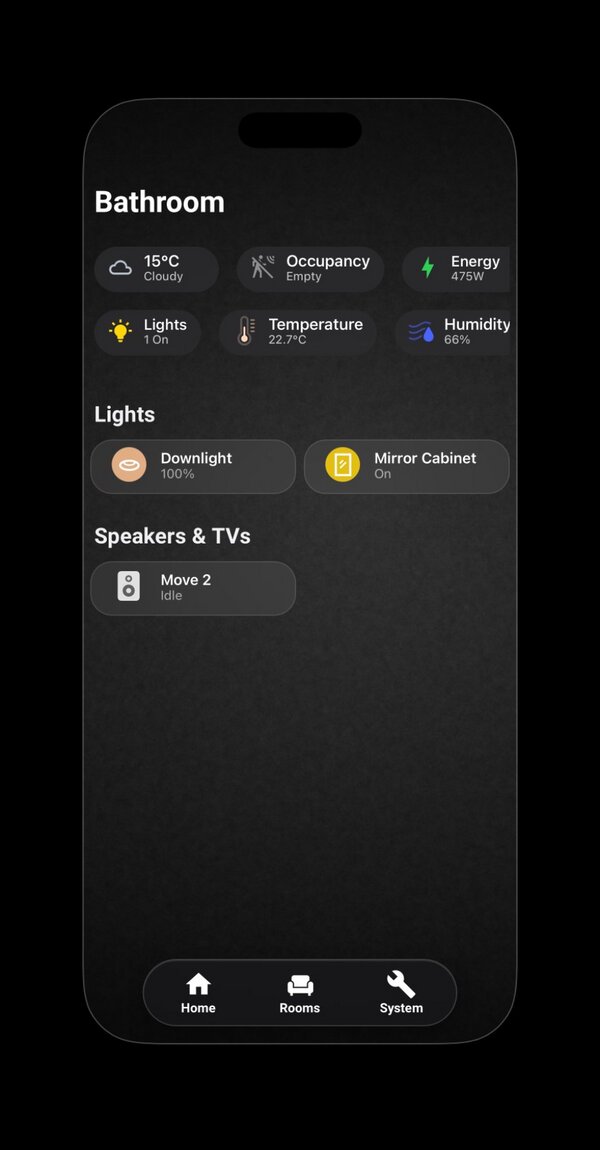
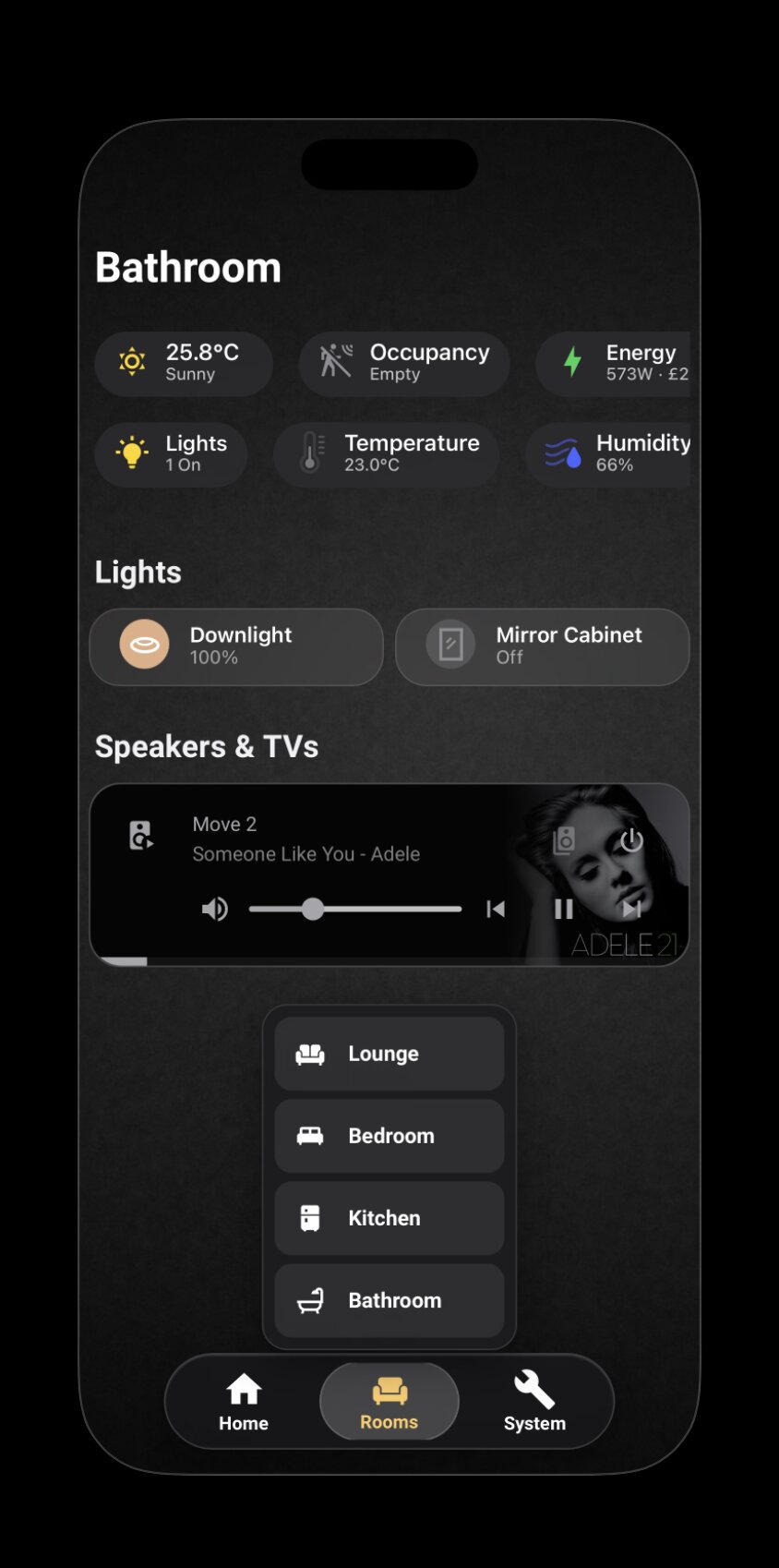
Bathroom view
Bathroom · Minimal — the single colour is the one "on" state.
Lounge media section
Media · Sonos Home Cinema, Move 2 grouping, Apple TV.
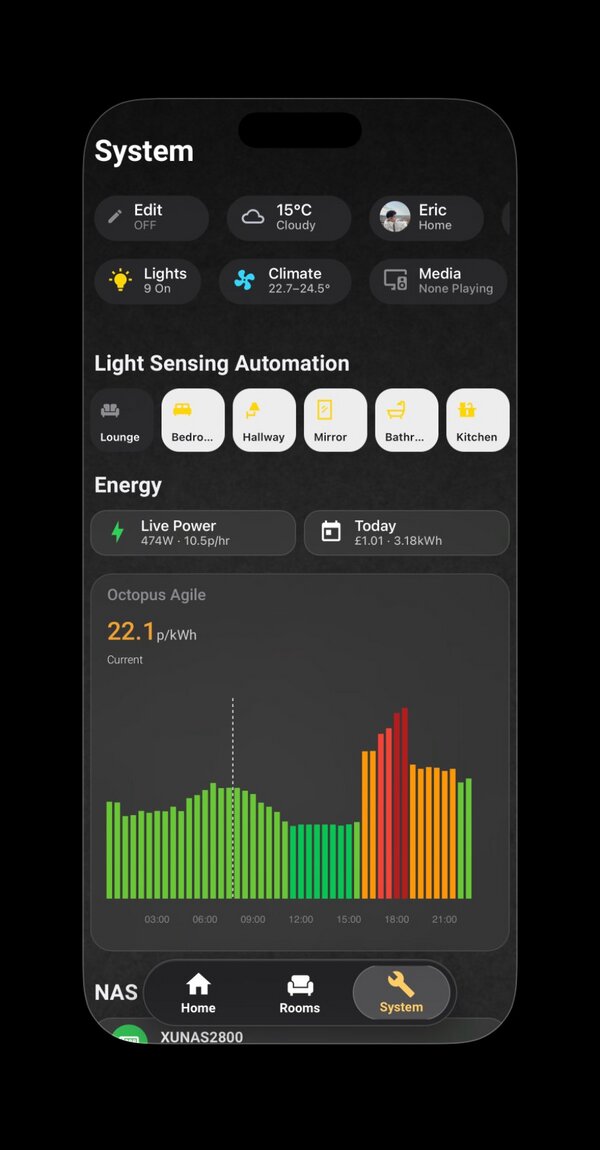
System view
System · Automation toggles, Octopus Agile chart, NAS health.

My role

  • System architecture across lighting, climate, AV, energy, security
  • Multi-protocol integration design — KNX, Zigbee, Wi-Fi, IR, MQTT
  • UI design and YAML implementation in Apple HIG idiom
  • Commissioning, testing, ongoing maintenance — self-performed end-to-end
A Colour is information, not decoration.

Status colours map to Apple HIG semantics — yellow for attention, green for active, red for alert. Lights show their actual RGB output; inactive states are grey. Every coloured pixel earns its place, a discipline that maps directly to commercial lighting scene design. Where two information channels are needed — temperature, for example — colour carries semantic state while shape carries continuous range. Never the same channel twice.

B YAML over UI clicks.

Every view, automation, and template lives in a version-controlled file — reproducible, diff-able, reviewable. The same engineering standard expected on a commissioning project.

C Native gestures over reinvented controls.

Where the platform's native popups work, I use them. Where they don't, I intervene at the shadow DOM level rather than reinvent the control. The Mitsubishi AC popup was deliberately left native — the engineering cost didn't justify the marginal gain. Knowing when not to build is part of the job.

D Depth visible in the details.

A polished surface earns trust; the details under it earn respect. Powercalc models, Adaptive Lighting curves, shadow DOM fixes — the unglamorous work is documented as evidence, not hidden.

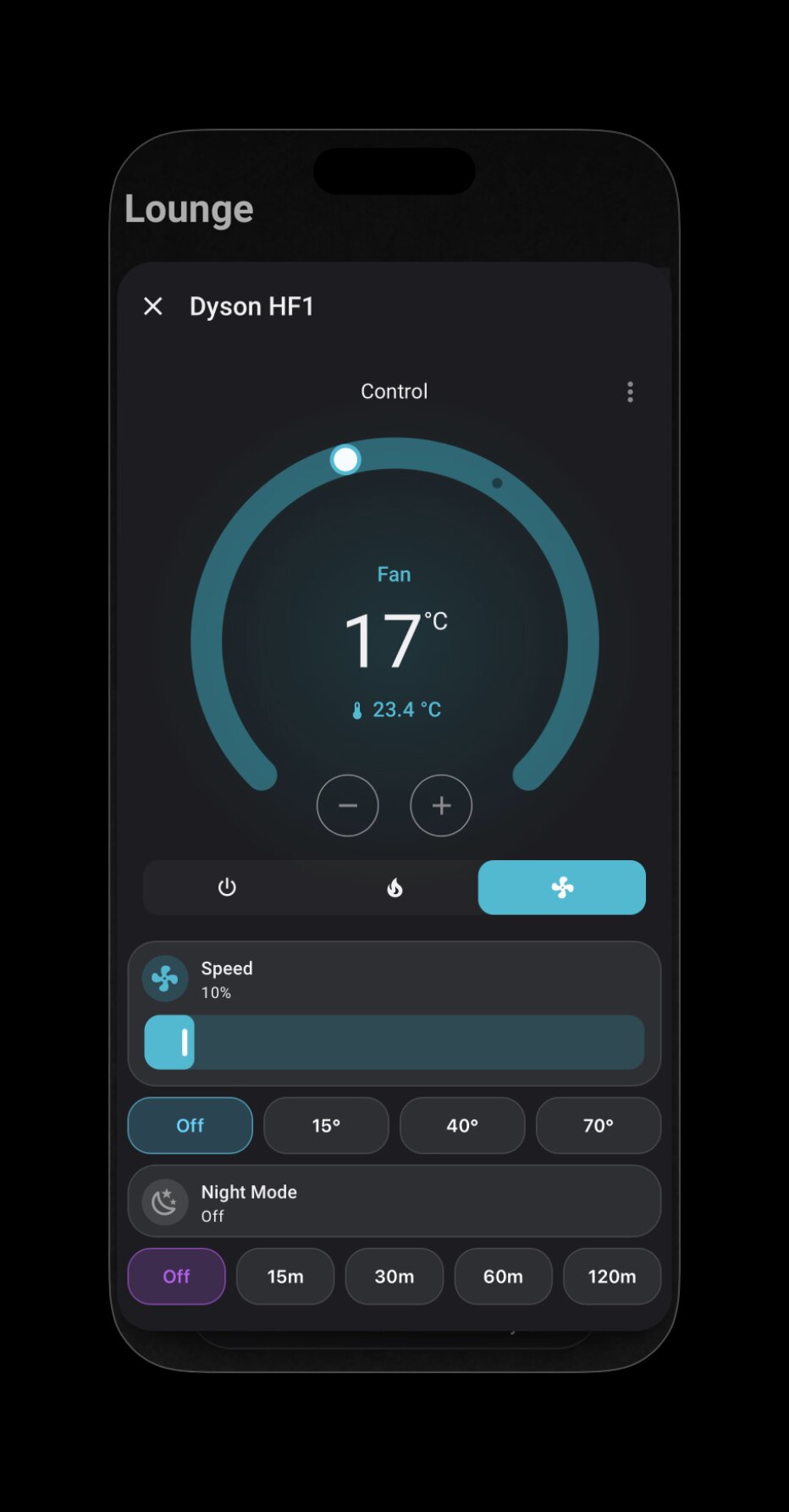
Dyson HF1 custom popup with circular dial, speed slider, oscillation angles, and timer presets

Counterpoint to C

When to build.

The Dyson HF1 popup is the opposite case. The native control couldn't express the things this device actually does — granular speed, oscillation angles, timer modes, night-mode state — without forcing the user through three layers of menus. So this one is fully custom: circular temperature dial, inline speed slider, four oscillation presets, and timer scheduling on the same surface.

Two air-treatment devices in the same home, two opposite decisions. Both are documented; neither is an accident.

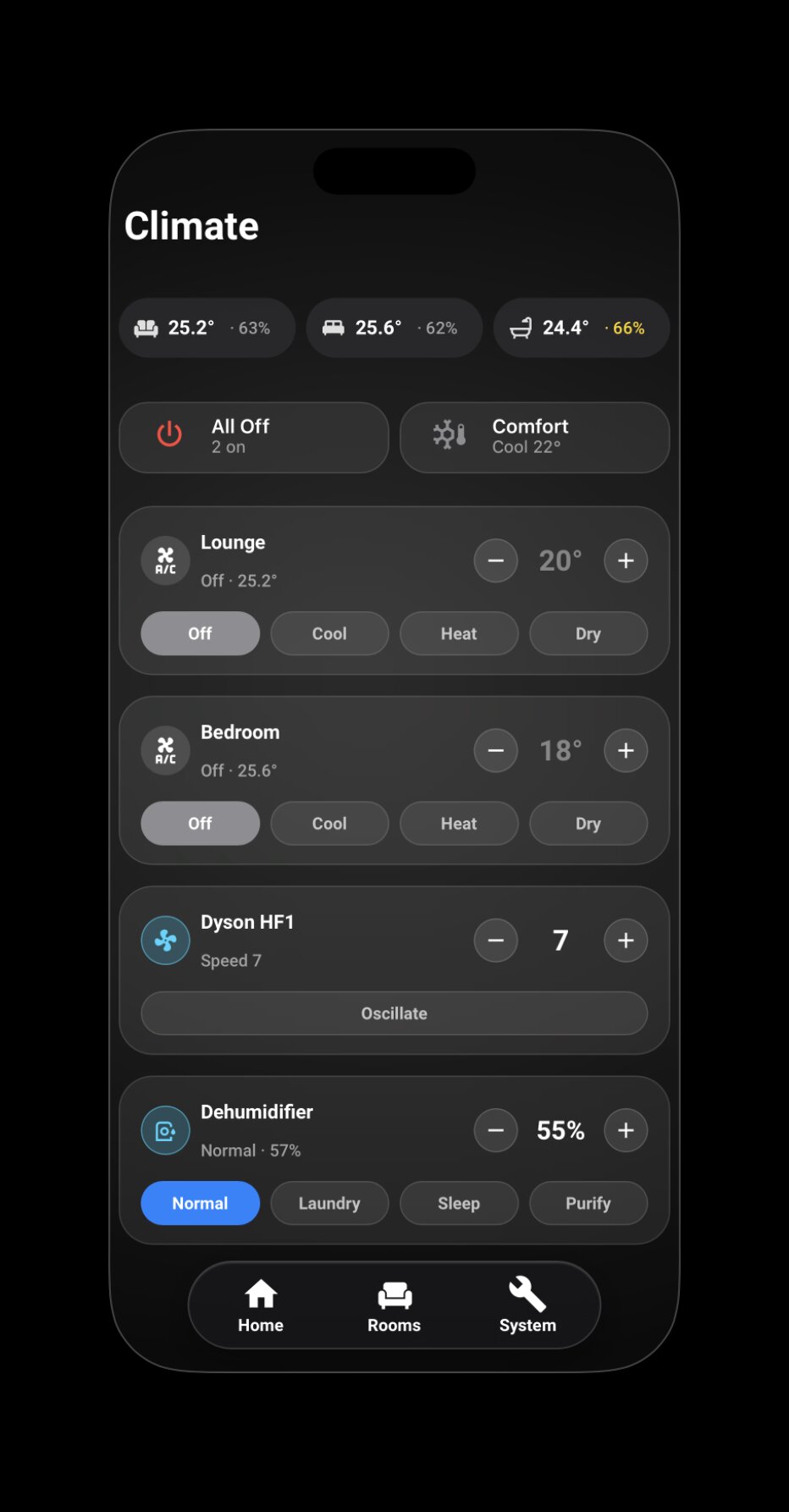
Climate subview — multi-device control across three rooms with quick actions, two AC cards, Dyson HF1 fan, and dehumidifier with preset modes

Counterpoint, extended

Use the platform, don't override it.

The Climate subview needed its own background — a softer, blurred variant of the main dashboard's, to signal "different context." The first instinct was to inject CSS through card-mod and force the override. It worked, then it didn't — the override fought the very element it was trying to replace, and the real cause was a stacking context I'd missed at the HA root level.

The pivot was to stop fighting the platform. Home Assistant exposes a --view-background CSS variable for exactly this purpose. Setting it through the view config gave the same result in three lines of YAML — no overrides, no shadow DOM, no cascade games. Fewer moving parts is a feature, not a constraint.

A small detail in the same view makes the same point in a different register: the Dyson HF1's fan icon rotates at a period proportional to actual speed — 10% gives a 5-second cycle, 100% gives 0.8s. Motion carries information the same way colour does in principle A. Neither is decoration.
Centerpiece Case Study

From Lutron's Palladiom to a Home Assistant popup.

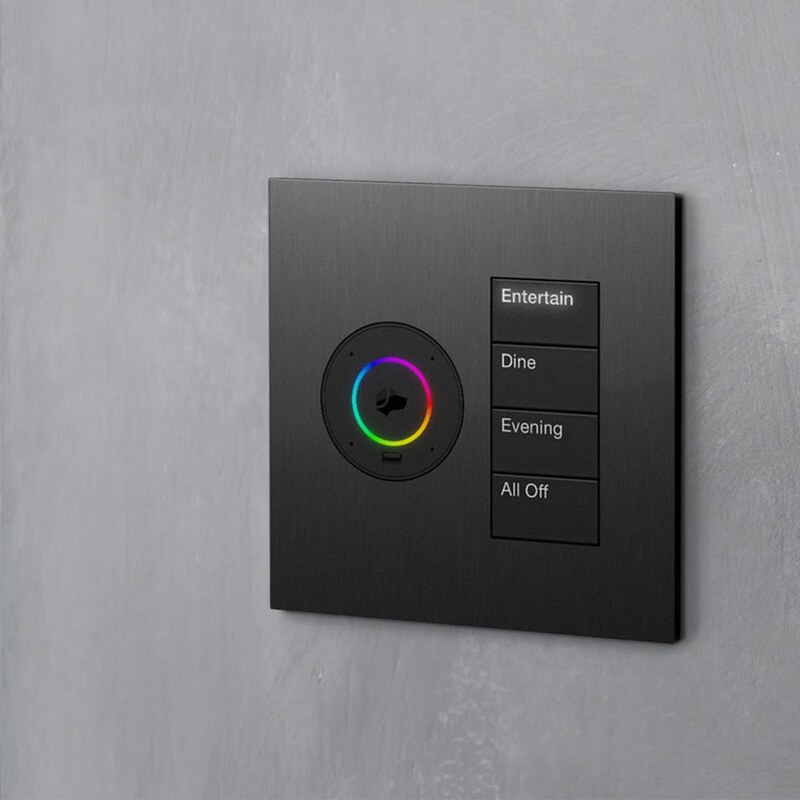
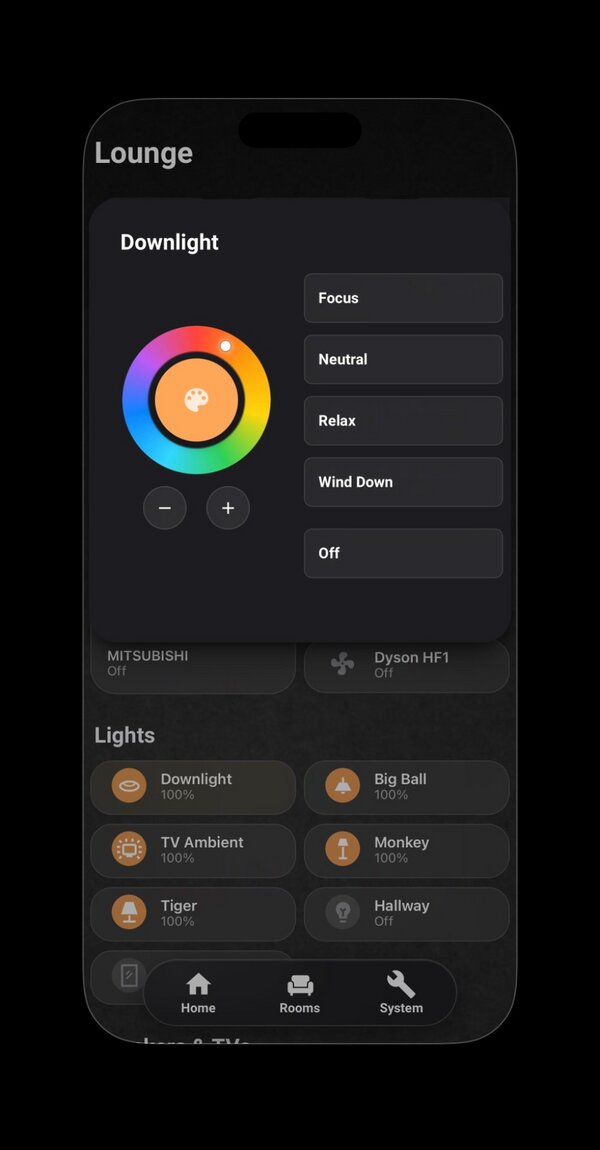
Lutron's Palladiom + Josh.ai keypad is the reference: four scene buttons, a hue ring for direct colour picking, one minimal black surface. I translated it into a Home Assistant popup — same four-scene logic extended to five presets, same conic-gradient hue ring driven live from color_mode and color_temp_kelvin, each preset bound to a single tap and identified by its own Apple HIG status colour.

Lutron Palladiom + Josh.ai keypad with conic-gradient hue ring and four scene buttons
Reference · Lutron Palladiom + Josh.ai · @lutronelectronics, Apr 2025
Home Assistant tunable white keypad popup on iPhone, showing conic-gradient ring and five scene buttons
Translation · Home Assistant popup in YAML + CSS
SceneKelvinPurpose
Focus4440 KCool work light, daylight-equivalent
Neutral3610 KDefault — daytime balance
Relax2710 KWarm evening light
Wind Down2200 KPre-sleep, melatonin-friendly
Off"All Off", Lutron seeTouch-style separator

Conic-gradient colour ring with dual mapping — hue direct, colour temperature mapped to a 20°–55° angular sub-range. The marker position is computed live from the light's color_mode and color_temp_kelvin attributes.

# Each scene binds one Kelvin value; state template detects active scene
- type: custom:button-card
  template: keypad_btn
  name: Focus
  tap_action:
    action: call-service
    service: light.turn_on
    service_data:
      color_temp_kelvin: 4440
  state:
    - operator: template
      value: |
        [[[ return entity.state === 'on' &&
            Math.abs((entity.attributes.color_temp_kelvin || 0) - 4440) < 100; ]]]
      styles:
        card: [{ background: 'rgba(255,214,10,0.15)' }]
        name:  [{ color:      '#FFD60A' }]

Case Study

Energy visibility, solved at two layers.

The client wants to know what today cost. The engineer wants to know which device, when. The same telemetry surface answers both — at two different layers of resolution, deliberately.

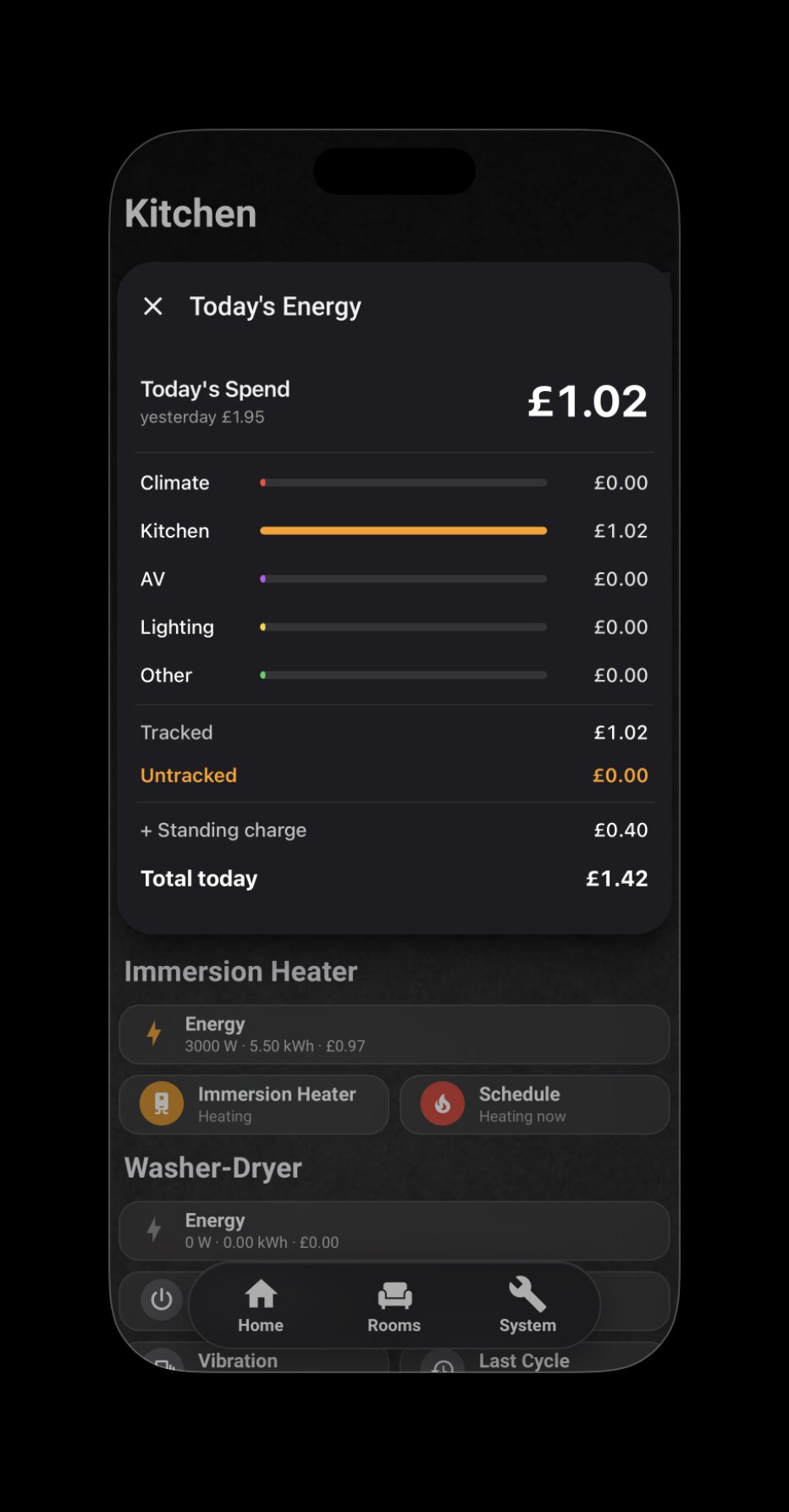
Today's Energy popup showing five spend categories with today vs yesterday context, untracked load surfaced as a first-class signal, with standing charge displayed separately from consumption
  • Client layer — Today's Energy

    A single-tap popup answers "where did today's money go?" — five categories ordered by cost, today vs yesterday for context, with Untracked load surfaced as a first-class signal alongside Standing charge and Total. Visual grammar follows Apple HIG; information grammar follows how clients actually read a utility bill.

  • Engineer layer — Half-hourly drill-down LIVE

    Underneath, the HA Energy Dashboard tracks 51+ measured loads at half-hourly granularity — nine individual appliances, four climate devices, lighting and AV as Powercalc-grouped totals, four miscellaneous. A Sankey diagram resolves the flow from Grid through Home to category and device.

  • Agile tariff, volume-weighted

    Per-device cost uses today's volume-weighted average rate, not the snapshot rate — preventing the "12p consumption suddenly costs 36p" distortion that snapshot-priced calculations produce. Standing charge displays separately from consumption, never silently summed.

  • Untracked as a signal, not a defect

    The Untracked figure (currently ~41% of consumption) is the unmetered baseline — a quantified delta between the SMETS2 meter and per-device telemetry, named and surfaced rather than hidden. Naming the baseline is what makes any future anomaly instantly visible. A permanent diagnostic surface, not a deficiency.

My role

  • Telemetry layer architecture across 51+ measured loads
  • Octopus Agile tariff API integration with volume-weighted cost calculation
  • Client popup design (Apple HIG idiom) and engineer dashboard structure
  • Untracked baseline named as a first-class diagnostic surface

Real-World Diagnostic

When the telemetry didn't add up.

Eight months into occupancy, the baseline power never dropped below ~570 W — even with every controllable load off. Here's what happened next.

  1. Sep 2025

    Move-in. Baseline starts logging.

    Whole-home power monitored via Hildebrand Glow CAD from day one.

  2. Dec 2025 – May 2026

    The pattern hardens.

    Idle baseline persistently 500–600 W. Bills consistently higher than modelled. All known loads accounted for; the gap remains.

  3. May 2026

    Total Isolation Test.

    Hot-swapped the gateway and router onto a UPS to keep telemetry live, then cut the property's main breaker. Power should have read zero. It read 5.2 kW — proof an upstream circuit was billing this meter for an adjacent flat's HVAC.

  4. Jun 2026 — early

    Telemetry-led dispute.

    Quantified eight months of overcharge (£487 net) from half-hourly settlement data. Evidence pack circulated to Octopus Energy's senior team and the freeholder simultaneously.

  5. Jun 12 2026

    £850 settlement closed.

    Ex-gratia settlement signed. A separate BS 7671 compliance concern (an HVAC circuit bypassing the main isolation switch) was rectified as part of the remediation.

What this demonstrated

System-level diagnostic thinking — designing a controlled test that isolated the variable, not just reading a sensor. Using technical data as commercial leverage in a stakeholder negotiation. End-to-end ownership from anomaly to settlement, closed in 27 days.

Today

The anomaly, operationalised.

The £850 settlement wasn't a one-off — it became the blueprint for the daily dashboard. The "Untracked" figure in the Today's Energy popup is the direct legacy of that 5.2 kW phantom load: by naming the unmetered delta as a first-class daily metric, the system turns what used to be a hidden variable into a persistent baseline. Any anomaly above that baseline becomes immediately visible.

My role

  • Continuous baseline monitoring via Hildebrand Glow CAD over MQTT
  • Controlled isolation test design — UPS-backed gateway, telemetry preserved
  • Quantification from half-hourly settlement data, evidence pack assembly
  • Stakeholder negotiation and settlement — closed in 27 days end-to-end

Network Diagnostic

When the router moved and six cameras disappeared.

A network upgrade rebound every device from wired to wireless. Six Reolink cameras and the Frigate NVR went offline. The fix exposed an opportunity to refactor secrets out of plaintext at the same time.

  1. Trigger

    Router swap, DHCP rebind.

    Every connected device — including six Reolink cameras — re-registered on the new subnet. Each got a new IP.

  2. Symptom

    HA Reolink integration stuck "Initializing". Frigate offline.

    The dashboard cameras went grey. Two separate failure modes, one root cause.

  3. Diagnosis 1/3

    IP mismatch surfaces.

    Frigate's config file still pointed at the old camera IPs. Updating those was easy. The harder problem was Home Assistant.

  4. Diagnosis 2/3

    The E1 Pro uses a distinct MAC per interface.

    Wired and wireless interfaces on the same camera report different MAC addresses — which means DHCP reservations by MAC bind to one interface only. Moving from cable to wifi looked, to the network, like a different device entirely.

  5. Diagnosis 3/3

    HA refused to reconfigure: unique_id mismatch.

    This isn't a bug — it's a security feature. Home Assistant binds device entities to a hardware identifier (here, MAC) so that a different device on the same IP can't quietly inherit your automations. Recognising that as protection rather than obstruction changes the fix.

  6. Resolution

    Re-pair + secrets refactor in one atomic deploy.

    Deleted and re-paired the Reolink integration on the new MAC. While inside the Frigate config anyway, refactored credentials out of the compose file into an env_file secrets pattern — eliminating plaintext passwords from both files. A single redeploy injected new env vars, new IPs, and the new MAC bindings together.

What this demonstrated

Network-layer diagnostic thinking. The discipline to recognise that "the integration is broken" was actually "the integration is protecting you". And the instinct to fold an architectural improvement — secrets externalisation — into the same deploy as the incident fix. Zero entity_id changes, zero automation rewrites, zero dashboard churn.

Under the Hood

Automation logic.

Sixty-plus automations run the home. A few that show the level of logic involved.

Multi-sensor presence inference (Bathroom)

PIR for instant trigger, mmWave for presence maintenance, plus a cross-zone occupancy-exclusion template that infers bathroom occupancy from recent activity elsewhere in the home — with a 30-minute fallback timeout so lights never stay on indefinitely. Four trigger paths handled in one mode: restart automation.

Washer-dryer state machine

A vibration sensor drives a multi-stage state machine: double-shake confirmation to filter transient noise, a 20-minute refractory period to skip internal baseline cycles, and a debounced 5-minute checkout to detect true cycle end. On completion, it increments a cycle counter and fires a predictive-maintenance alert at 40 cycles.

Energy-arbitrage notifications (Octopus Agile)

When wholesale prices turn negative, an automation parses the API's forward window, applies a 2-minute debounce to filter transient dips, and pushes a notification telling me exactly when the negative-price period ends — so high-draw appliances can be run while being paid to consume.

Tech

Built with.

Smart Building & Lighting

KNX (ETS6) — Partner Certified · Adaptive Lighting · tunable white scene logic · Lutron-style keypad UX · Apple HomeKit

Home Assistant Layer

Home Assistant Core · YAML · Lovelace Sections · button-card · card-mod · browser_mod · Mushroom · ApexCharts

Protocols & Integrations

Zigbee2MQTT · MQTT (Mosquitto) · SmartIR · Broadlink IR · Sonos · Music Assistant · Octopus Energy API · Hildebrand Glow CAD (SMETS2) · Powercalc · Reolink · Frigate NVR

Infrastructure

UGREEN NAS (Ubuntu VM) · Docker · Eaton UPS via NUT · Cloudflare Tunnel · Cloudflare Pages · GitHub · VS Code · Chrome DevTools (shadow DOM)

Why this work

Residential, not commercial. Boutique, not scale. The work that engages me is the long-relationship kind — designing for how a specific household actually lives, then staying close enough to refine it over years. That bias is why I sat KNX Partner, not a generic IT certification.